Requesting a Cancellation
Cancellation form update
From the 31st of October 2026, our cancellation form will no longer be available. All cancellation requests should be made through the CloudPass Admin Centre where you can request to cancel an entire site or individual subscriptions.
Step 1: Open Sites
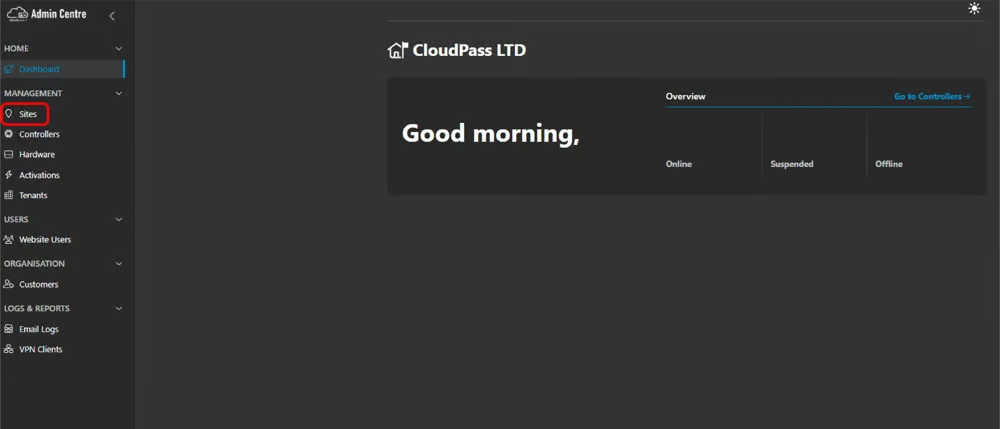
Log into the CloudPass Admin Centre. you will then be taken to the home dashboard. From the navigation menu on the left-hand side select Sites.
Step 2: Selecting what you want to cancel
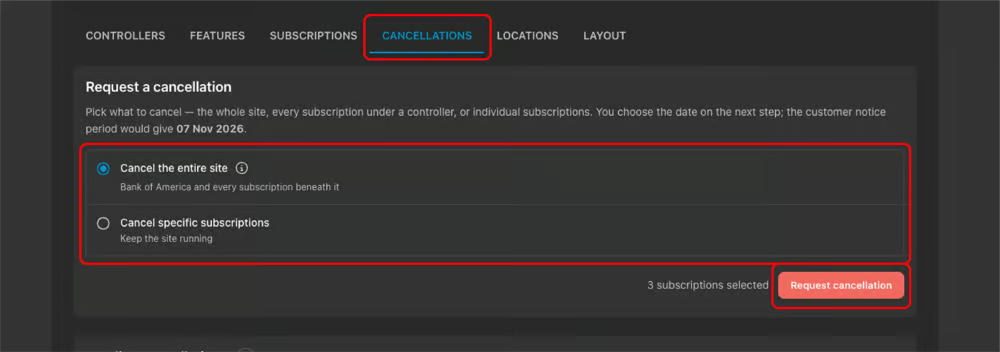
First, begin by selecting the site you want to manage and open the Cancellations tab. Choose to either cancel the entire site or cancel specific subscriptions. Once selected then click Request cancellation.
Step 3: View pending cancellations
Your submitted request will appear under Pending Cancellations. No separate form is needed.

Was this article helpful?
That’s Great!
Thank you for your feedback
Sorry! We couldn't be helpful
Thank you for your feedback
Feedback sent
We appreciate your effort and will try to fix the article